Mastering Apple Home Automation: A Step-by-Step Guide
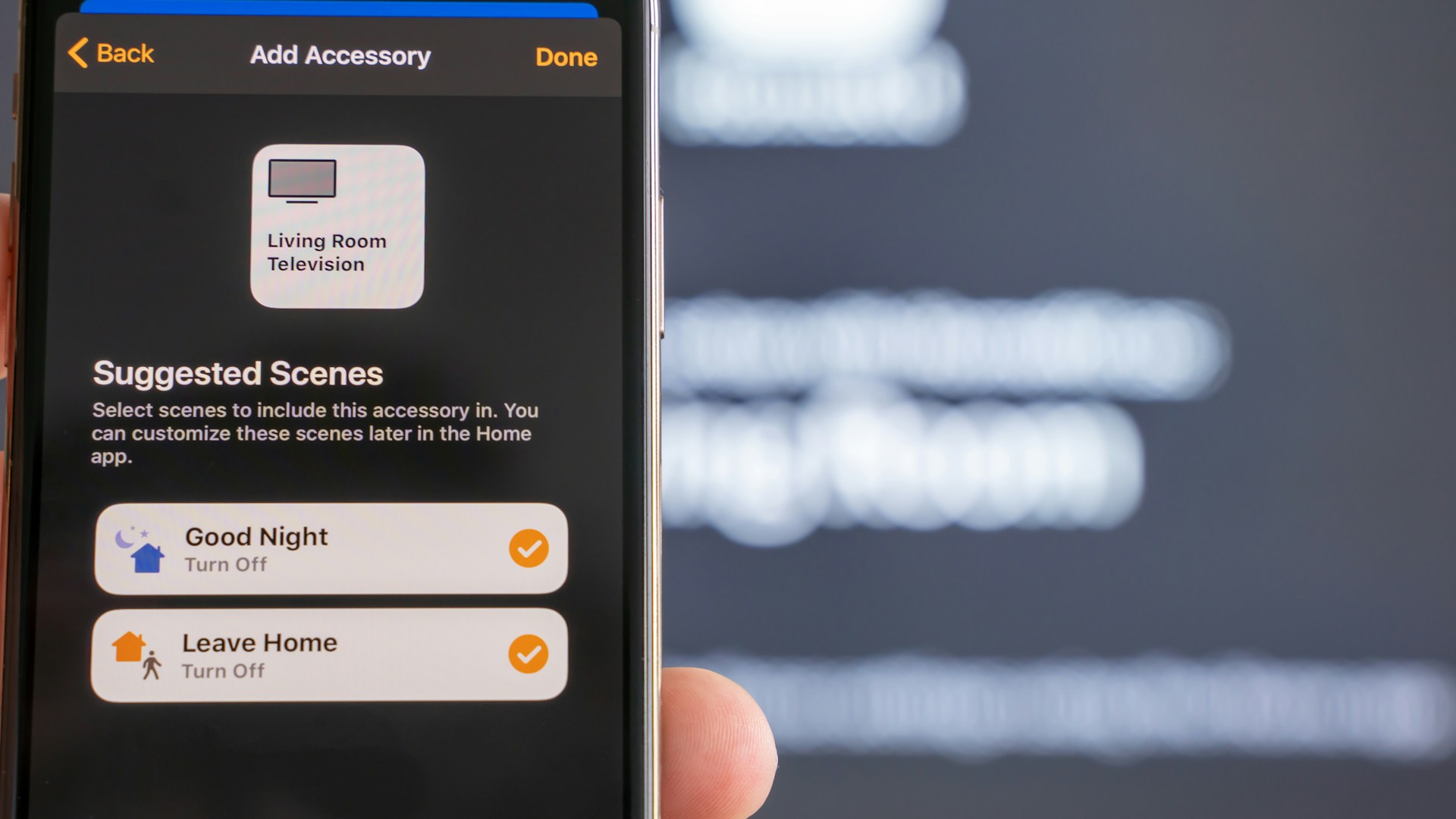
Table of Contents
Apple Home Automation is an excellent way to streamline your living space, making it smarter and more energy-efficient! If you’re invested in the Apple ecosystem, you’ve made a wise choice. Using Apple HomeKit and compatible devices, you can manage everything from lighting to security, all through your iPhone or iPad. Bottom line: Apple HomeKit is the best platform for those who already use Apple devices and want seamless integration.
What You Need to Get Started
Before diving in, ensure you have these essentials:
-
HomeKit-Compatible Devices: Only certain smart devices work with Apple HomeKit. Look for products bearing the “Works with Apple HomeKit” label. Some great options include:
- Philips Hue Smart Bulbs (around $15 each): These bulbs let you adjust brightness and colors.
- Ecobee Smart Thermostat (about $249): Allows you to control your home’s heating and cooling remotely.
- August Smart Lock (approximately $199): A smart lock that lets you secure your door via your Apple device.
-
Apple Device: While you can use one of Apple’s Home-enabled devices (Apple TV, iPad, or HomePod) as a hub to control your smart home, you’ll primarily use your iPhone or iPad for management.
-
Apple Home App: This app comes pre-installed on all Apple devices. You can access all your connected devices in one place.
-
Wi-Fi Network: Ensure your home Wi-Fi network is stable, as it serves as the backbone of your system.
Setting Up Your Apple Home Automation
-
Add Devices in Home App:
- Open the Home app.
- Tap the “+” sign in the upper-right corner.
- Select “Add Accessory.”
- Use the camera to scan the HomeKit setup code available on your smart device.
-
Organize Your Home:
- You can create groups for different rooms — for example, Living Room, Kitchen, and Bedroom.
- Drag and drop devices into their respective rooms to make navigation easier.
-
Create Scenes and Automations:
- Scenes allow you to control multiple devices with one command. For instance, create a “Movie Night” scene that dims the lights and turns on the TV, all with a single tap.
- Automations can be configured to perform actions based on triggers, like time of day or when you leave home. For example, set lights to turn on automatically at sunset.
-
Using Siri: Apple HomeKit works seamlessly with Siri. You can issue voice commands like “Hey Siri, turn on the living room lights,” to control your devices hands-free.
Eco-Friendly Benefits of Apple Home Automation
Implementing Apple Home Automation not only enhances your living experience but also promotes sustainability. Here are a few eco-friendly advantages:
- Energy Savings: Smart thermostats like Ecobee adjust temperatures based on your habits, significantly reducing energy usage and cost.
- Improved Efficiency: Smart lighting systems, such as Philips Hue, allow you to schedule when lights turn on and off, minimizing unnecessary energy consumption.
- Water Management: Smart faucets and irrigation systems can be programmed to avoid over-watering your plants, conserving water resources.
Who This is For
- Apple Ecosystem Users: If you already use Apple products, integrating HomeKit can enhance your existing setup.
- Tech-Savvy Homeowners: If you enjoy experimenting with technology, setting up HomeKit is straightforward and offers endless possibilities for customization.
- Sustainability Advocates: If you believe in reducing energy consumption and promoting eco-friendly living, using smart devices can contribute positively.
Who Should Skip This
- Non-Apple Users: If you rely on Android devices or other platforms, Apple HomeKit won’t work for you.
- Budget-Conscious Shoppers: The initial investment in HomeKit-enabled devices can be pricey. If you’re looking for a budget option, consider non-smart alternatives for basic tasks.
- Basic Users: If you prefer keeping things simple and don’t care much for tech, investing in a complex home automation system may be overkill.
Conclusion and Recommendations
Apple Home Automation offers a streamlined and eco-friendly approach to managing your smart home. I recommend starting small with a few smart light bulbs or a thermostat to get a feel for how HomeKit can improve your daily living. You can gradually scale up your setup as you become more familiar with the technology.
Quick Comparison of Smart Home Devices
| Device | Price | Key Features | Ecosystem Compatibility |
|---|---|---|---|
| Philips Hue Smart Bulb | ~$15 | Adjustable colors, remote control | Apple HomeKit, Android |
| Ecobee Smart Thermostat | ~$249 | Room sensors, energy reports, Siri voice control | Apple HomeKit, Alexa |
| August Smart Lock | ~$199 | Keyless entry, remote access | Apple HomeKit, Android |
By starting your Apple Home Automation journey today, you’ll not only enhance your living environment but also contribute to a more eco-friendly lifestyle. Don’t wait; make your home smarter and greener now!